
Before you activate
Install and activate the WordPress plugin first. If Smart Related Products has no valid licensing state, its commercial storefront runtime is disabled, but the License page remains available so you can activate a license.
1. Start a trial or activate a paid license
Choose the appropriate action on the License page and complete the activation flow shown there.
- Open Smart Related Products → License.
- Start a trial or choose the paid-license activation action that applies to your store.
- Complete the activation flow, then return to the License page.
- Confirm that the page shows an active trial or active paid-license state.
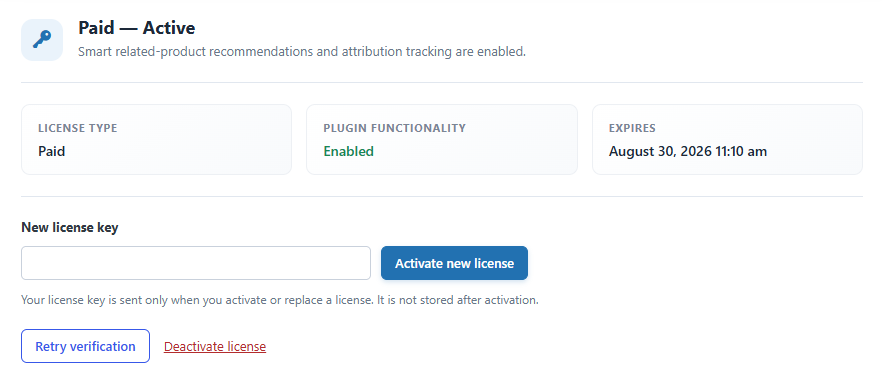
2. Understand the license state
The License page also shows your license type, functionality state, expiry status, and any relevant recovery or renewal information.
Active trialCommercial runtime and normal admin features are available. The plugin shows the remaining trial time.
Active paid licenseCommercial runtime and normal admin features are available.
Expired trialStorefront/runtime features are disabled. Settings and stored data stay in place for a later valid activation.
Expired paid licenseThe existing activated site continues to run the plugin; new downloads, future versions, and support are no longer included until renewal.
3. Manage an activation
Use the License page for activation replacement, retry verification, and the explicit Deactivate License action when you need to release an activation.
Next steps
With an active license, continue to setup and troubleshooting guidance.


